

1. Why Record Snoring & Sleep Sounds on Your iPhone?
Most of us spend a third of our lives asleep with almost no objective sense of what happens in our bedroom between midnight and morning. A partner might mention snoring, or you might wake up tired after eight hours in bed without realizing that 3 a.m. coughing spells, pets, hallway doors, or passing trucks repeatedly interrupted your lighter rest.
Tracking nighttime sound with the iPhone or iPad already charging on your nightstand requires zero wearables and adds almost no friction to bedtime. Better yet, audio gives you verifiable firsthand insight. When you try simple adjustments — elevating your pillow, sleeping on your side, running a humidifier, skipping late-evening drinks, or sealing a drafty window — reviewing sound timelines and actual clips over several nights shows plainly what changed.
Getting truly helpful insight, however, means sidestepping four common headaches: fan or AC wind noise drowning out subtle breathing, choppy clips sliced so tight they make no sense, unrealistic biometric claims that microphones cannot measure, and cloud apps that upload private bedroom recordings to remote servers. Let's look at how to get each one right.
2. Bedside Placement & Reducing Wind Noise (5 Steps)
Clear overnight sleep audio is half thoughtful software and half simple room acoustics. Taking two minutes before bed for these five steps makes an immediate difference:
- Plug into power and confirm healthy free storage: Continuous overnight tracking draws steady power. Plug your iPhone or iPad into a bedside charger, confirm the device isn't running warm, and keep plenty of available storage. On older iPhones or iPads, closing unused heavy apps helps iOS keep background tracking running smoothly all night.
- Place flat on a nightstand within arm's reach: Rest the device on a solid, level bedside table roughly at mattress height with the bottom microphone facing unobstructed toward the bed. Never tuck a charging iPhone under a pillow, blanket, or thick cloth — fabric muffles sound detail, creates loud sheet-rustling artifacts, and traps heat.
- Stay clear of fans, AC vents, and air purifiers: Steady airflow across a microphone is the fastest way to ruin bedroom recordings. Direct wind creates broadband rumble that lifts the room's baseline noise floor and hides gentler snoring or breathing patterns. Before turning out the lights, glance at Snorvia's standalone Decibel Meter (an in-app relative sound level estimate that does not save audio) to see if your room looks calm — and avoid placing your phone on the same table as a vibrating humidifier or box fan.
- Disconnect external audio devices and enable Sleep Focus: Ensure Bluetooth earbuds, speakers, or external mics are disconnected so audio stays cleanly on the built-in microphone. Enabling Sleep Focus or Do Not Disturb also helps keep midnight phone calls, voice chats, or accidental Siri triggers from interrupting recording.
- Lock your screen normally and add a backup alarm for critical mornings: Once tracking starts in Snorvia, you can lock the display freely — screen lock does not pause overnight capture or the in-app alarm. Just avoid swiping Snorvia away in the app switcher. For flights, exams, or can't-miss mornings, pair Snorvia with a backup alarm in Apple's built-in Clock app (see our Support & FAQ for full tips).
3. Why Natural Room Context Beats Choppy Fragments
Open many older snoring trackers in the morning and you'll find a cluttered wall of abrupt one-second audio bursts. Tap play and you hear a sudden clipped noise before silence cuts back in — leaving you guessing whether it was snoring, turning over in bed, a throat clear, or a door down the hall.
Human ears rely on before-and-after room context to recognize sounds effortlessly. Snorvia frames every nighttime moment with natural lead-in room quiet, the complete sound itself, and a gentle fade-out so morning playback immediately tells the real story:
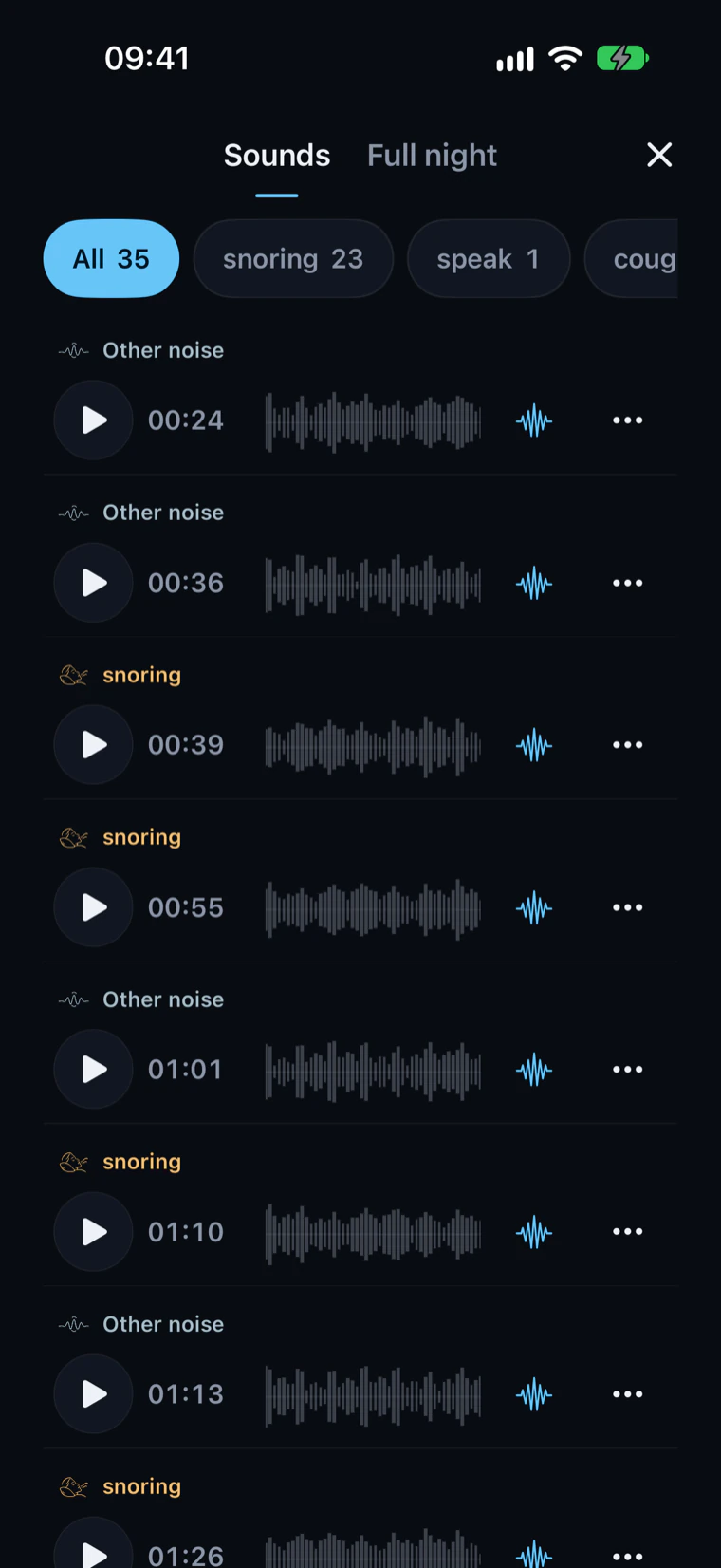
- Instant room recognition: Hearing a brief stretch of calm bedroom tone right before a sound lets your ears orient immediately — separating rhythmic snoring from a passing car or creaking floorboard.
- Comfortable, balanced morning listening: Soft sleep talking and loud sneezes vary enormously in raw volume. Balanced playback makes subtle moments audible without startling you at breakfast.
- Full-night timeline when you want the big picture: Whenever you want to check what happened between highlighted moments, Snorvia Pro also lets you browse whole-night audio along your sleep timeline.
4. Understanding 8 Everyday Nighttime Sounds
Snoring is only part of the bedroom story. Using on-device sound recognition, Snorvia calmly organizes overnight audio into 8 familiar everyday categories so your Morning Report stays easy to scan:
Overnight snoring & breathing
Sleep talking & murmured voices
Occasional or seasonal night coughs
Sudden sneezes overnight

Pets moving or early birds
Doors, footsteps & appliances
Rain, wind & distant thunder
Conservative bucket for ambient sounds
In real bedrooms, restraint beats false certainty. Muffled sounds under blankets, overlapping room noise, or distant echoes are inherently ambiguous. Rather than forcing speculative guesses or claiming to identify who made a sound, Snorvia keeps uncertain moments conservatively grouped under Other Noise — preserving the clip for your own ears instead of quietly discarding a potential sleep disruptor.
5. Honest Comparison: iPhone Alone vs. Apple Watch & Apple Health
One of the biggest myths in consumer sleep apps is that a bedside phone alone can measure blood oxygen, heart rate, or clinical sleep architecture. Microphones and wrist wearables shine at completely different jobs. Here is the honest breakdown:
| Insight | iPhone / iPad Alone | iPhone + Apple Watch / Apple Health (Optional) |
|---|---|---|
| Snoring & 8-Category Night Audio | Full support (contextual clips + on-device recognition) | Full support (iPhone captures clear local audio) |
| Ambient Bedroom Sound Level | Included (relative sound level estimate, not a calibrated meter) | Included (see sound peaks alongside rest patterns) |
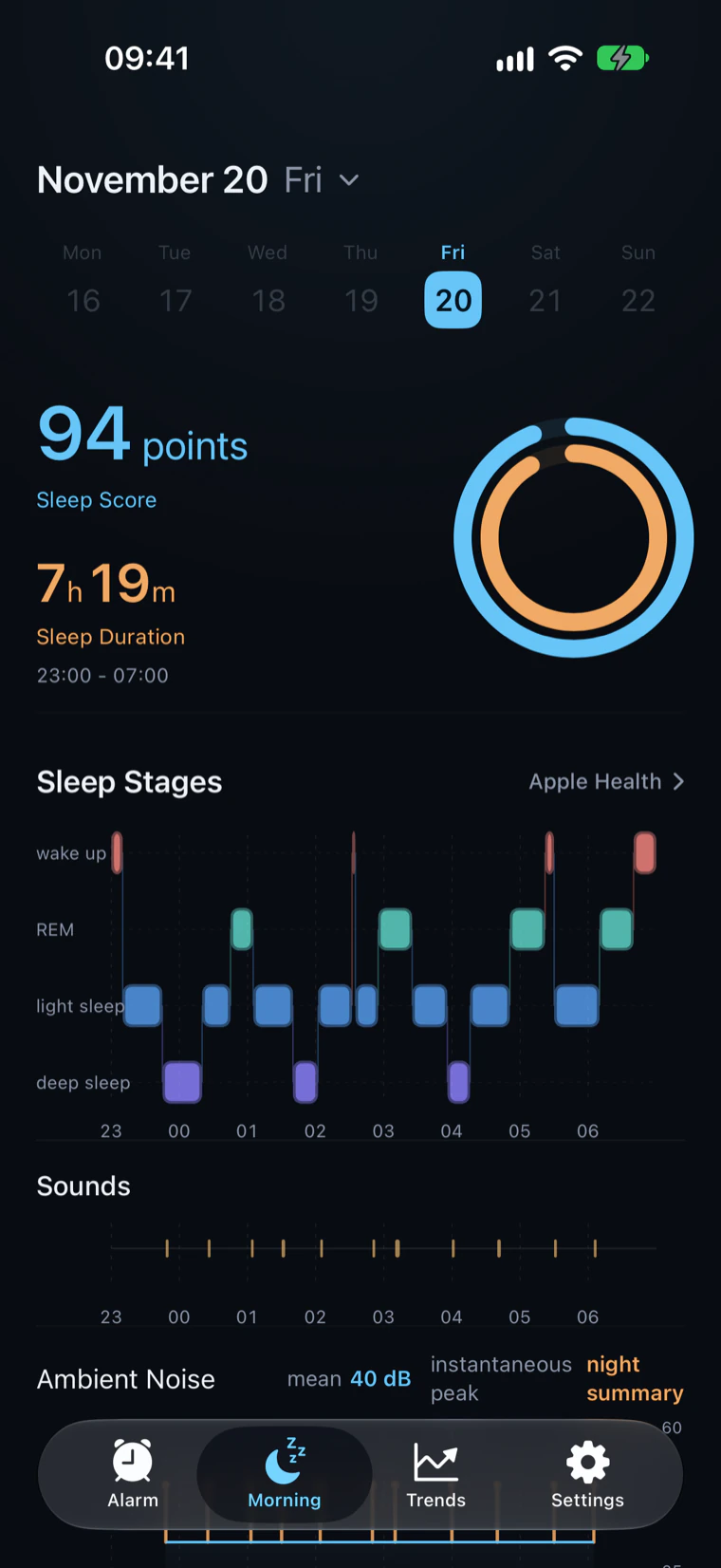
| Sleep Stage Timeline | Microphone-based estimates clearly labeled for personal review | Prioritizes Apple Health wearable stages (Awake, Core, Deep, REM) |
| Heart Rate, Blood Oxygen, HRV, Wrist Temp & Respiratory Rate | Never faked or simulated (hidden cleanly when no wearable data exists) | Read optionally from Apple Health and unified on one Morning Report |
| Sleeping Comfort | Nothing on your wrist — ideal if you dislike wearing a watch to bed | Most complete pairing of room acoustics and biometric context |
In short, overnight sound clarity is your iPhone's strength, while physiological vitals belong to wearables like Apple Watch. Without a watch, Snorvia gives you clean, honest sound insights with zero fabricated metrics. If you wear an Apple Watch, enabling optional Apple Health access brings your wearable stages and vitals onto the same Morning Report and multi-period Trends alongside your snoring and bedroom noise.
6. Gentle Smart Wake & Honest Alarm Boundaries
Understanding your sleep matters most when mornings feel noticeably calmer. Snorvia brings sleep tracking and gentle waking into one quiet flow:
- Smart wake window & silent sleep-only mode: Choose a smart wake window to rise gently with a gradual fade-in melody (or personal local audio you import), or turn the alarm off completely for quiet sleep-only tracking on weekends.
- Wake Challenges & quick daytime naps: Heavy sleepers can add optional Shake, Math, or Type-a-Phrase Wake Challenges in Pro. For afternoon rest, enable the ready-made Apple Shortcuts trigger inside Snorvia Settings to start a timed nap without changing your nightly plan.
7. Privacy-First Sleep Audio Checklist
Keeping a microphone open beside your bed overnight calls for architectural privacy — not vague promises. Before trusting any sleep sound tracker, check these six essentials:
- On-device audio by default: Recordings and clips stay strictly on your iPhone or iPad unless you actively choose to export or share them.
- No forced account sign-up: You should never need an email, phone number, or social login just to record sleep privately at home.
- Zero third-party ad trackers: Bedroom habits and sleep schedules should never be shared with ad networks or data brokers.
- On-device sound recognition: Sound classification runs locally on your Apple device instead of sending overnight audio to remote servers.
- Summary-only cloud sync: If you opt into iCloud Sync across your devices, only structured sleep summaries sync — never raw audio, ringtones, favorites, or personal settings.
- Simple export & instant deletion: Customizable automatic audio cleanup, protection for Favorite clips, readable personal data export, and one-tap deletion anytime.
Snorvia was designed from day one around every one of these commitments. You can review all 13 sections in our Privacy Policy.
8. When to Consult a Healthcare Professional
Not a Medical Device: Snorvia is built for personal sleep tracking and wellness insight only. It is not a medical device and does not provide medical advice, diagnosis, or treatment, nor can it diagnose sleep apnea or any medical condition.
Occasional mild snoring from nasal congestion, fatigue, or sleeping on your back is common. However, if personal observations or partner feedback point to any of the following, consider speaking with a qualified doctor or sleep specialist:
- Loud, habitual snoring most nights of the week;
- Witnessed pauses in breathing, gasping, snorting, or choking sensations during sleep;
- Persistent daytime fatigue, trouble focusing, or waking with morning headaches or dry mouth despite enough time in bed;
- Snoring alongside elevated blood pressure or other cardiovascular concerns.
Structured notes about your schedule and habits can help start an informed conversation with your physician — while leaving clinical evaluation and formal sleep studies firmly with qualified medical professionals.
9. Frequently Asked Questions
Will recording snoring overnight drain my iPhone battery or fill up storage?
Plugging your iPhone into power overnight prevents battery drain and keeps background recording steady. For storage, Snorvia manages local recordings efficiently with customizable automatic cleanup for older nights, while keeping your Favorite clips protected unless you delete them manually.
Can an iPhone measure blood oxygen or heart rate overnight without an Apple Watch?
No. An iPhone microphone alone cannot measure blood oxygen, heart rate, HRV, or wrist temperature. Snorvia never fabricates placeholder vitals: those readings appear only when you grant optional Apple Health access and have supporting wearable data such as from an Apple Watch. Without a watch, Snorvia still offers complete nighttime sound clips, ambient decibel trends, and clearly labeled microphone-estimated sleep stages.
Why do some sleep recorders produce choppy clips that are hard to understand?
Many tools slice audio tightly around a single loudness spike, cutting off the quiet room tone before a sound starts and its natural fade afterward. Preserving natural before-and-after room context with comfortable, balanced playback volume lets you recognize instantly whether a moment was snoring, rustling sheets, or street noise.
If I share a bed, can an iPhone accurately tell whether I or my partner snored?
A single bedside smartphone microphone cannot reliably guarantee speaker identity in a shared bedroom. Snorvia uses conservative sound recognition and never claims to identify speakers, placing uncertain or overlapping sounds under Other Noise. Placing your phone on the nightstand closer to your own side and reviewing contextual audio is the most practical approach.
Can an iPhone snoring tracker diagnose sleep apnea?
No. Consumer iPhone sleep trackers are not medical devices and cannot diagnose sleep apnea or any health condition. Overnight sound records help you observe personal snoring patterns and lifestyle adjustments, and can serve as helpful notes if you choose to speak with a qualified doctor about a clinical evaluation.
How can I make sure an overnight sleep recorder keeps my bedroom audio private?
Choose a truly local-first sleep app: no required account sign-up, zero third-party advertising trackers, on-device sound recognition, default on-device audio storage with no automatic uploads, summary-only optional iCloud sync that excludes raw audio, and easy local export and deletion. Snorvia meets every one of these standards.
